Prototype pollution
Prototype Pollution occurs when an attacker manipulates __proto__ (
See ECMAScript® 2015 Language Specification),
usually by adding a new Prototype onto __proto__. Since __proto__ exists for every Object, and every Objects
inherits the Prototypes from their Prototype, this addition is inherited by all the JavaScript Objects through the
prototype chain. Detecting these vulnerabilities requires reading and understanding a lot of JavaScript code, which can
be time-consuming.
Malicious players can take advantage of the ability to insert properties into existing JavaScript code, and execute either Denial of Service attacks, by triggering JavaScript exceptions, or Remote Code Execution, by injecting malicious code. In short, it is an injection attack that targets JavaScript runtimes.
JavaScript can run on the client-side and server-side of a web application, and prototype pollution vulnerabilities can exist on both sides.
Steps
Client-side prototype pollution (CSPP)
Find prototype pollution sources
Testing a prototype pollution sources/Try to modify the prototype
Find possible prototype pollution gadgets
Try the Burpsuite DOM Invader browser extension
Server-side prototype pollution (SSPP)
Polluted property reflection
If no reflection, try:
Status code override
JSON spaces override
Charset override
Try the Server-Side Prototype Pollution Scanner extension
Prototype pollution sources
Prototype pollution is a vulnerability that occurs when merging an object with a user controlled JSON object. It can
also occur as a result of an object generated from query/hash parameters, when the merge operation does not sanitise the
keys. This makes it possible to use property keys like __proto__ , by which arbitrary assignments to the
Object.prototype (or other global prototypes) can be created. When this happens, it is referred to as a prototype
pollution source.
Detecting CSPP with DOM Invader
DOM Invader is a browser-based tool that helps test for DOM XSS vulnerabilities using a variety of sources and sinks, including both web message and prototype pollution vectors. It is available via Burp’s built-in browser, where it comes preinstalled as an extension. When enabled (if the BurpSuite icon is not visible, pin it under the jigsaw first), DOM Invader adds a new tab to the browser’s DevTools panel. To use it for finding CSPP (client-side prototype pollution), turn it on in the DOM Invader settings.
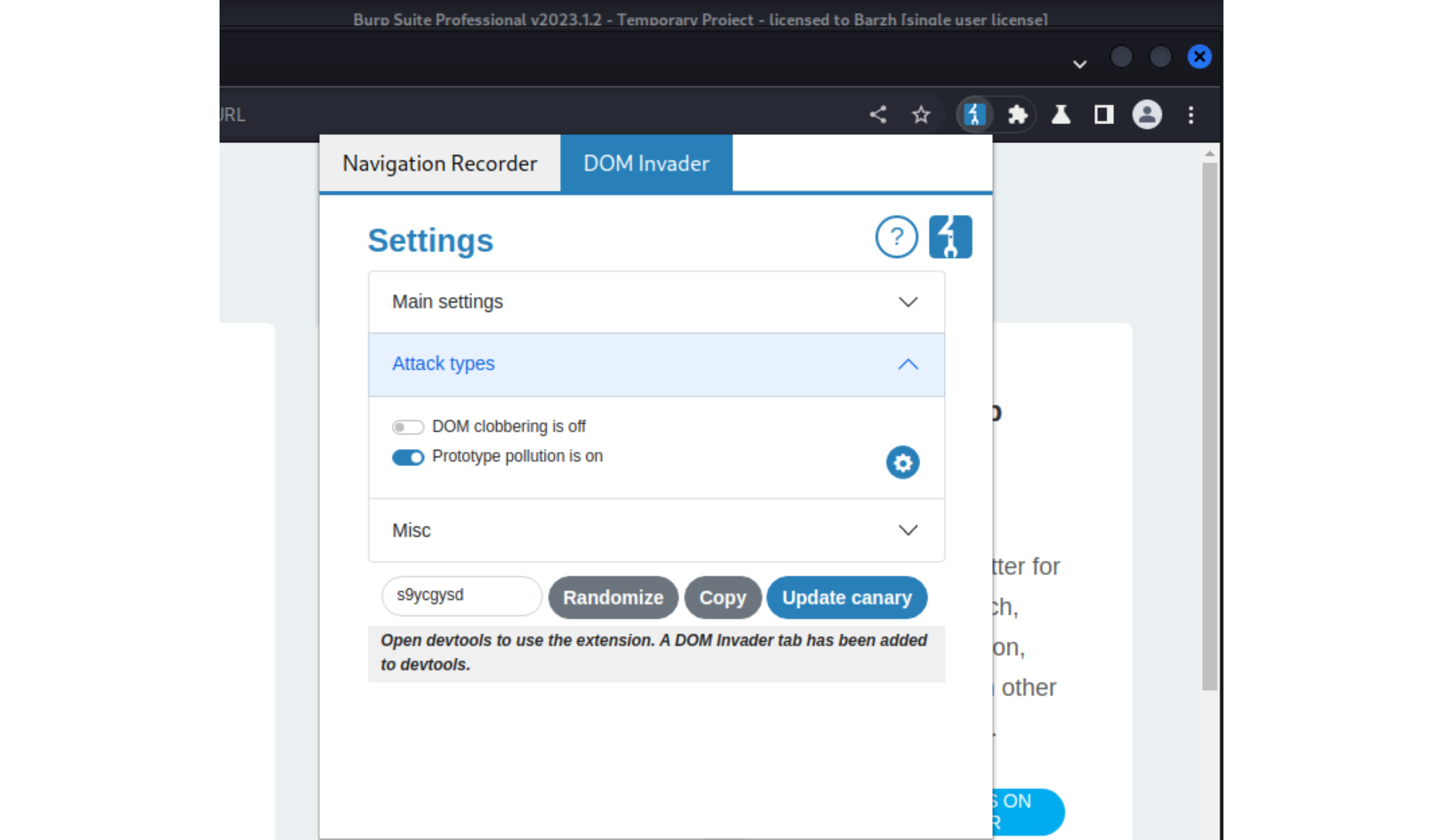
And try some DOMInvader prototype pollution test cases like prototype-pollution-query-string-gadget to check it works: See this Portswigger vid for the entire explanation.
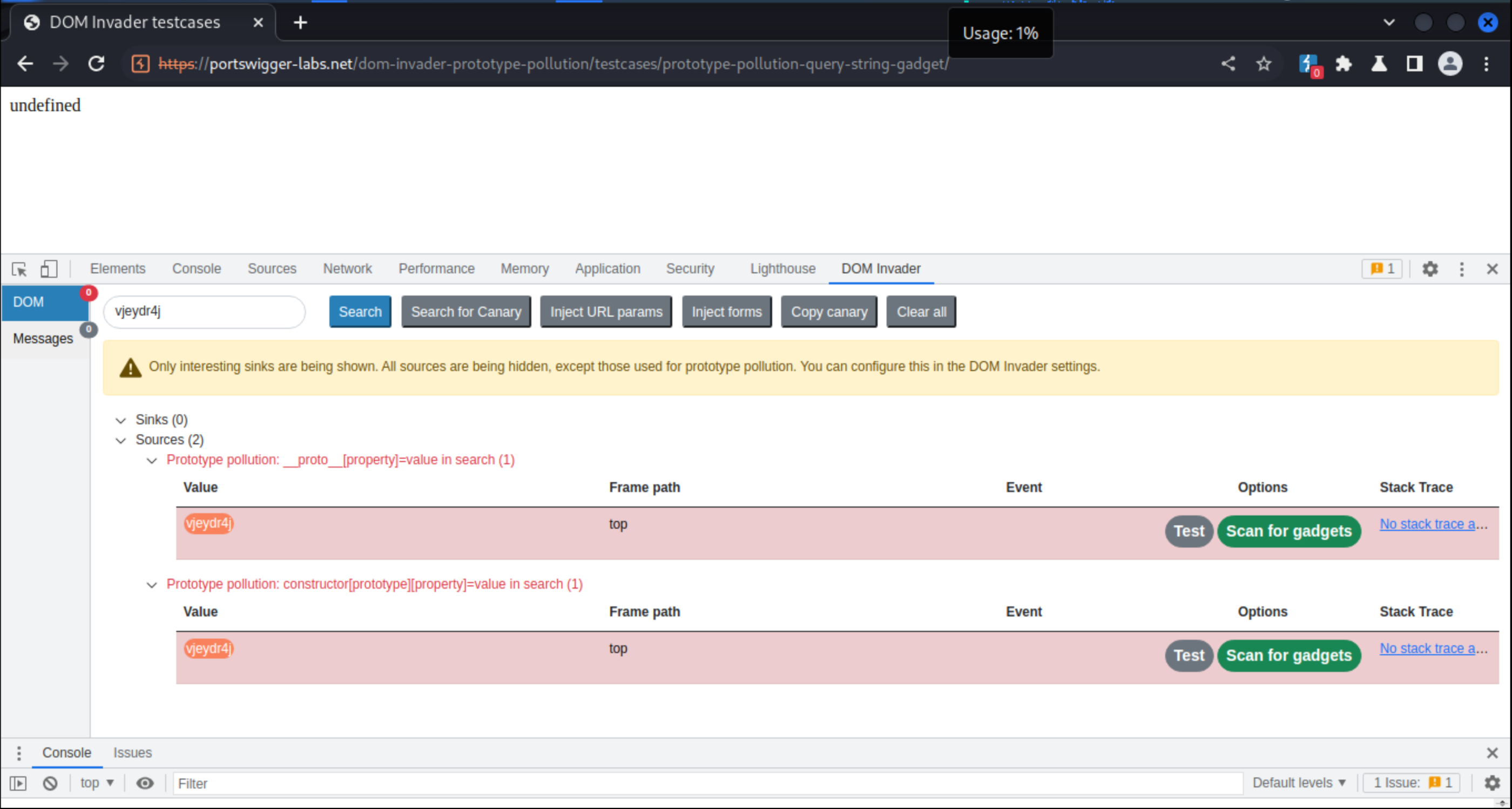
To confirm the vulnerability, click Test, and in the new tab that appears choose Inspect element -> DOM Invader to
view the Object:
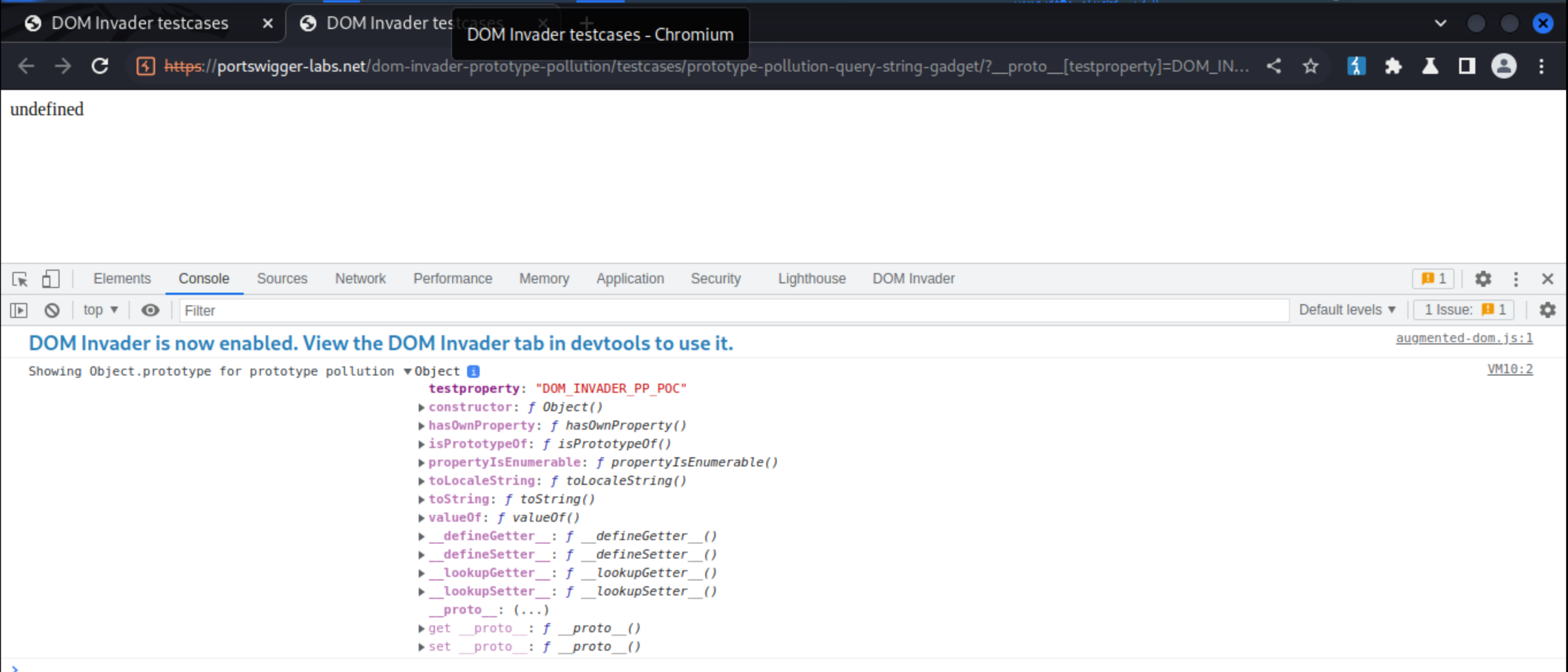
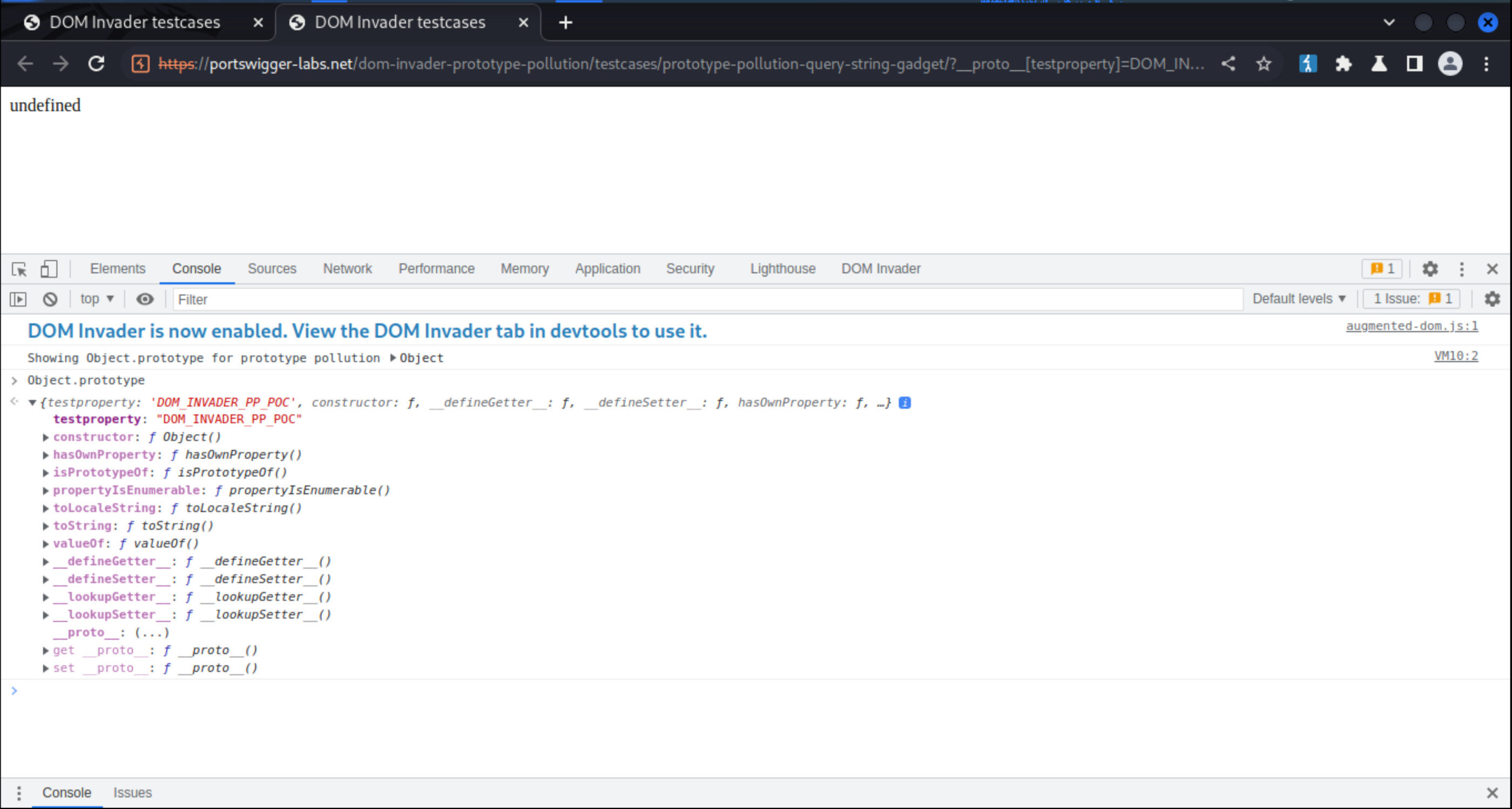
Type Object.prototype and enter:
To find gadgets, click Scan for Gadgets, and in the new tab that appears choose Inspect element -> DOM Invader
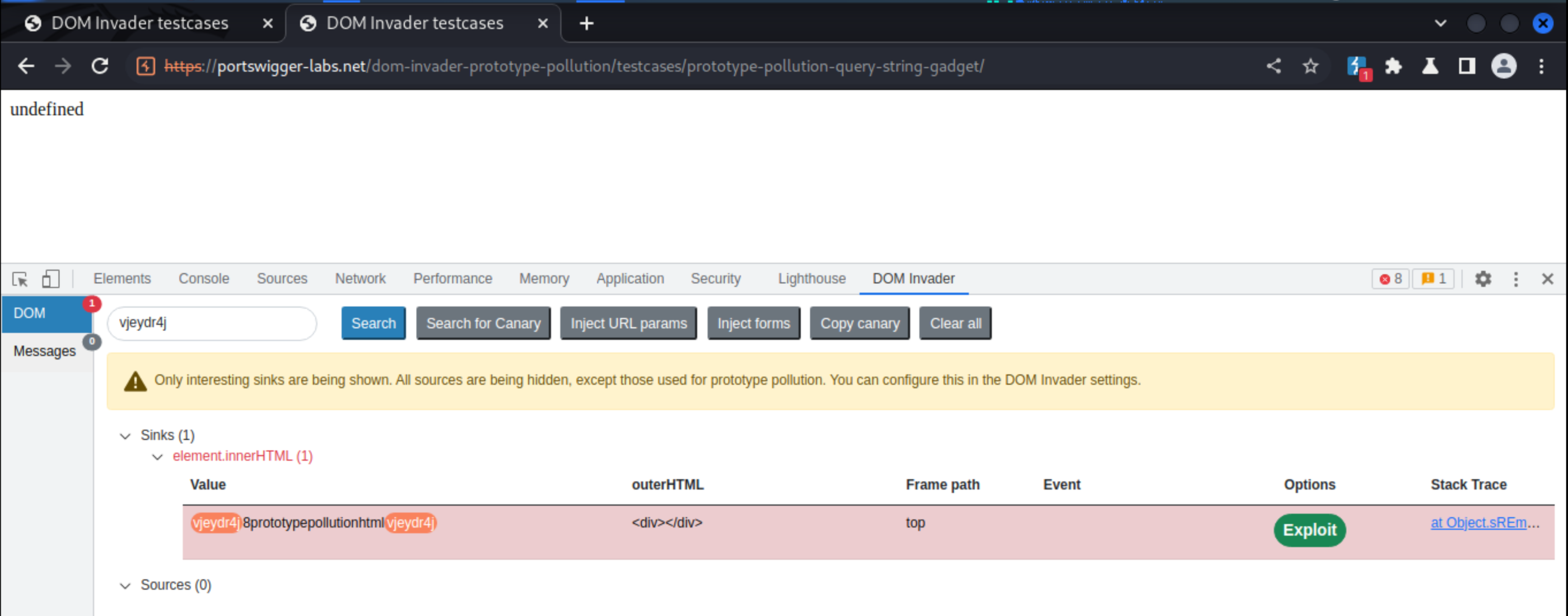
In this example, DOM Invader has discovered a gadget called “html”, which ends up in an innerHTML sink. A green “
Exploit” button has appeared, combining the source discovered with the gadget and automatically creating a prototype
pollution exploit.
Detecting SSPP with the Server-Side Prototype Pollution Scanner
Server-Side Prototype Pollution Scanner
Install the Server-Side Prototype Pollution Scanner extension from the BApp Store and make sure that it is enabled.
Explore the target website using Burp’s browser to map as much of the content as possible and accumulate traffic in the proxy history.
In Burp, go to the
Proxy -> HTTP historytab.Filter the list to show only in-scope items.
Select all items in the list.
Right-click the selection and go to
Extensions -> Server-Side Prototype Pollution Scanner -> Server-Side Prototype Pollution, then select one of the scanning techniques from the list.When prompted, modify the attack configuration if required, then click
OKto launch the scan.
In Burp Suite Professional, the extension reports prototype pollution sources it finds via the Issue activity panel
on the Dashboard and Target tabs. In Burp Suite Community Edition, the Extensions -> Installed tab, with the extension
selected, surfaces reported issues in its Output tab.
Bypassing input filters for server-side prototype pollution
Websites often attempt to prevent or patch prototype pollution vulnerabilities by filtering suspicious keys like
__proto__. This key sanitisation approach is not a robust long-term solution as there are a number of ways it can
potentially be bypassed:
Obfuscate the prohibited keywords, so they’re missed during the sanit.
Access the prototype via the
constructorproperty instead of__proto__.
Escalation
Impact varies, depending on the application logic and implementation, and includes DoS, and interfering with the JavaScript environment.
It is also a starting point for further attacks: A prototype pollution attack allows for leveraging gadgets loaded in the same context. These can potentially be used for escalating privileges or gaining access to sensitive information.
Client-side exploitation of a prototype pollution (CSPP) vulnerability can result in several attacks, such as cross-site scripting (XSS) attacks. In this case, threat actors look for a gadget that relies on the property of an object susceptible to pollution. If the object interacts with the page’s document object model (DOM), threat actors can trigger client-side JavaScript code execution.
Server-side exploitation (SSPP) can lead to more severe consequences, including remote code execution (RCE), SQL injection (SQLi), and authorisation and authentication bypasses.
Variants
The client-side cases reach DOM XSS through a polluted property, whether the source is the
query string, an alternative vector, flawed sanitisation, a third-party library, or a browser
API. The server-side cases are detected by side effect where nothing reflects, survive naive
filters that only strip __proto__, and escalate to privilege escalation, data exfiltration,
or remote code execution. The prototype pollution runbook splits
the two sides and their gadgets.
Resources
Prototype pollution – and bypassing client-side HTML sanitizers
Daily Swig:Prototype pollution: The dangerous and underrated vulnerability impacting JavaScript applications, August 2020
Portswigger Research articles: Server-side prototype pollution: Black-box detection without the DoS, February, 2023
Counter moves
Prototype pollution is the variant in play. These come back to the same answers: validated input, encoded output, server-side authorisation, and patched dependencies. The defender’s view can be found in the blue notes on the application layer as a target.